
A maintenance plan is a reusable schedule. You define it once, for example "oil and filter change every 5,000 km or every 3 months", then apply it to every vehicle that needs it. Locate then tracks each vehicle against the plan, shows when service is coming due, and emails the people you choose.
1. Create the plan
- Go to Operations > Maintenance Plans.
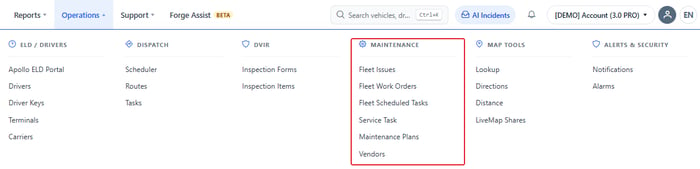
- Click Add New.
- Enter a Name (for example, Light-duty pickups: oil change) and an optional Description.
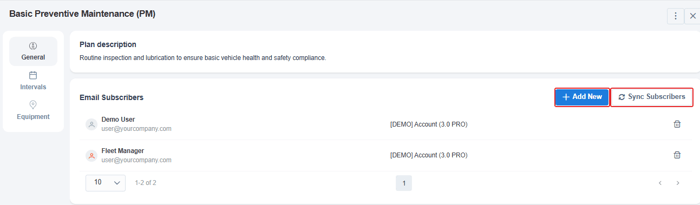
- Under Email Subscribers, add the people who should get reminders, then click Save.
2. Add the intervals
- Open the Intervals tab and click Add New.
- Fill in one or more of these:
- Odometer: the Mileage period (for example every 5,000 km).
- Time Interval: the Time period (for example every 3 months).
- Engine Hours: click Add Engine Hours for equipment that is serviced by running time.
- Set a Threshold for each one. This is how early you are reminded, for example 500 km or 2 weeks before the service is due.
- Under Service tasks, click Add New and choose the jobs to do at this interval, for example Engine Oil & Filter Change.
- Click Save. Add more intervals if the plan has other jobs on a different schedule.
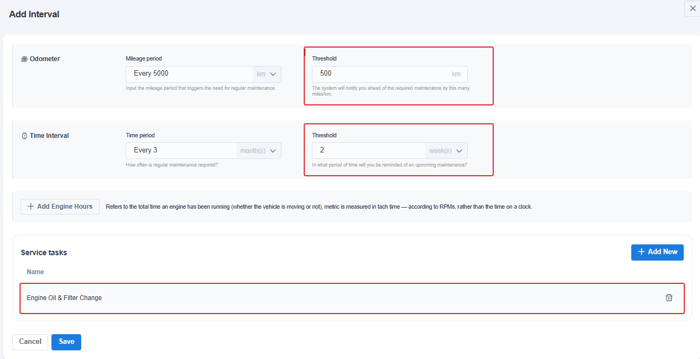
When an interval has both a distance and a time period, the service is due at whichever is reached first.
3. Apply the plan to vehicles
- Open the Equipment tab and click Add New.
- Choose the vehicles and save.
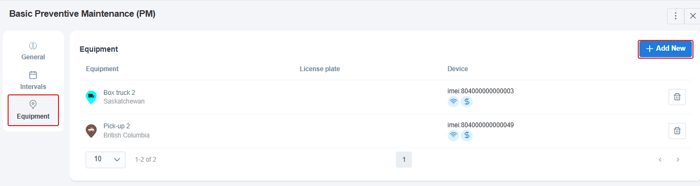
Each vehicle now has the plan's tasks under Maintenance > Scheduled Tasks, and they appear in Operations > Fleet Scheduled Tasks and in the Maintenance Tasks report.
When the work is done
Record it as a service entry on the vehicle, with the same service task. That resets the schedule: the next due point is counted from that service. See Where can I enter a vehicle maintenance record?
Related: How do I get maintenance reminders? · How do I schedule service for one vehicle?