
If your monthly invoice emails aren't arriving, work through these checks.
1. Check your billing subscribers
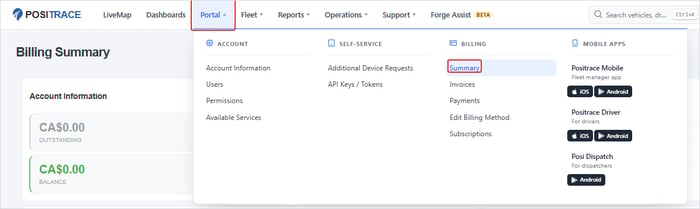
- Go to Portal > Billing > Summary.
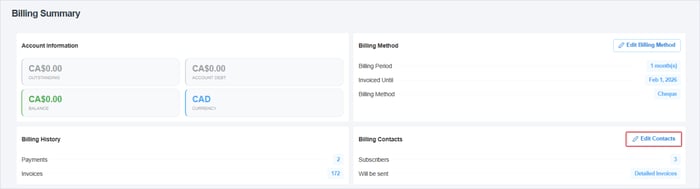
- In the Billing Contacts card, click Edit Contacts. Make sure every person who should receive invoices is listed under Billing Subscribers, and that each email address is spelled correctly.
- Click Billing Contacts at the bottom of the page and check each subscriber's Status. Only Active subscribers are sure to receive invoice emails.

| Status | What to do |
|---|---|
| Inactive | The user is inactive in Locate. Reactivate the user or add a different subscriber. |
| Unconfirmed | The email address has not been confirmed. Ask the person to confirm their email address. |
| Unsubscribed | The person unsubscribed from billing emails. Add a different subscriber, or contact us to restore the subscription. |
Only users with the Administrator role can change billing contacts. For details, see How do I set or change billing contacts and subscribers?
2. Check your spam or junk folder
Invoices are issued on the 1st of each month. Early in the month, check your spam or junk folder in case our email was filtered.
3. Allow our email domains
Add positrace.com and gpspolice.com to your safe senders list so you always receive our emails. Common addresses include:
- accounts@positrace.com (billing)
- support@positrace.com and gfmsupport@positrace.com (customer support)
- billing@gpspolice.com (billing – GPS Police)
- support@gpspolice.com (customer support – GPS Police)
If your company uses email filtering, ask your IT team to make sure our emails are not being blocked.
You can always download your invoices
Every invoice is available in Locate under Portal > Billing > Invoices. See Where can I find or download my invoices?