
Billing subscribers receive an email each time an invoice is issued. You can also set the billing address and billing contact shown on your invoices, and choose detailed invoices that list every billed device.
Who can do this: only users with the Administrator role can change billing contacts. Users with the Accountant role can view them.
Change billing contacts
- Go to Portal > Billing > Summary.
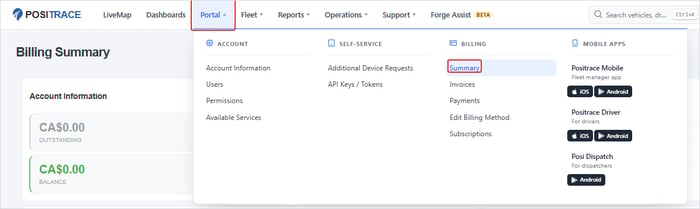
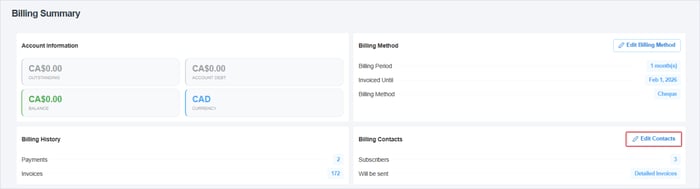
- In the Billing Contacts card, click Edit Contacts. The card shows how many subscribers you have and whether they receive Detailed Invoices or Compact Invoices.
- Update the fields you need:
- Billing Address – the address shown on your invoices. Choose an existing address or click Add New Address.
- Billing Contact – the main contact for billing questions. Choose a user on your account.
- Send Detailed Invoices – turn on to include the unique ID of each billed device on your invoices.
- Billing Subscribers – everyone who should receive invoice emails. Select a user on your account, or type any email address (it doesn't need to belong to a Locate user). To remove a subscriber, click the × next to it.
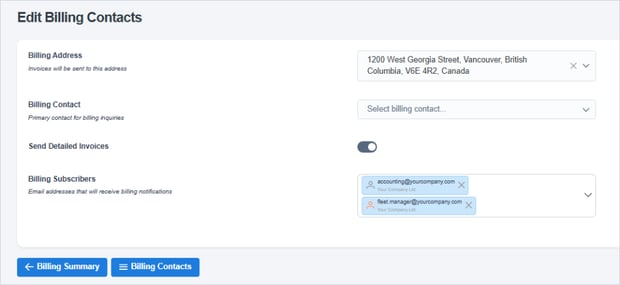
- There is no Save button: each change is saved as you make it. Click Billing Contacts at the bottom of the page to check the updated list.
Check subscriber status
The Billing Contacts list shows each subscriber's email, account and status. You can edit or remove a subscriber with the icons at the end of the row.
| Status | What it means |
|---|---|
| Active | The subscriber receives billing emails. |
| Inactive | The user is inactive in Locate. |
| Unconfirmed | The email address has not been confirmed yet. |
| Unsubscribed | The subscriber has unsubscribed from billing emails. |
A subscriber with any status other than Active may not receive invoice emails. If invoices aren't arriving, see I'm not receiving my invoices by email. What can I do?