
Locate emails a reminder when a scheduled maintenance task is coming due, so someone can book the work before it is overdue. You control two things: how early the reminder comes, and who receives it.
How early: the Threshold
Every interval in a maintenance plan or scheduled task has a Threshold. It is how far ahead of the due point you are reminded, in kilometres or miles, engine hours, or days, weeks or months. For example, with an oil change every 5,000 km and a threshold of 500 km, the reminder comes 500 km before the oil change is due.
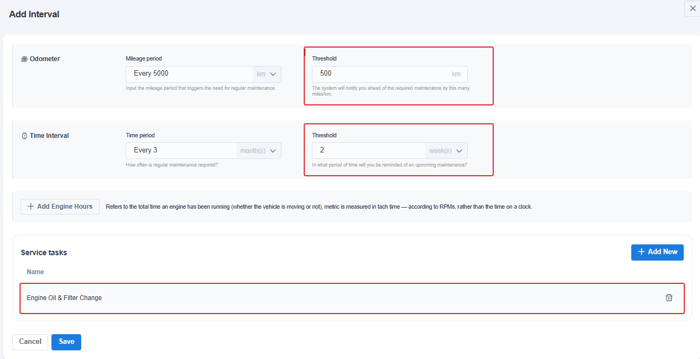
Once a task is inside its threshold, it shows as Due Soon. When it passes the due point, it shows as Overdue.
Who: Email Subscribers
- For a whole plan: go to Operations > Maintenance Plans, open the plan and use Email Subscribers > Add New on the General tab. If you change the list after the plan is applied to vehicles, click Sync Subscribers so the vehicles on the plan get the change.
- For one task on one vehicle: open the vehicle's Maintenance > Scheduled Tasks, edit the task with the pencil icon and change its Email Subscribers.
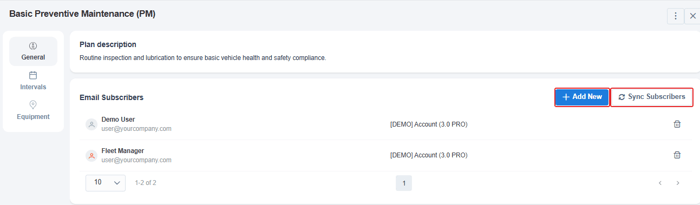
Subscribers are chosen from your Locate users. To add someone who isn't a user yet, add them under Portal > Users first. See How to add a new user to your account.
See what's due without waiting for an email
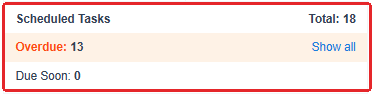
- One vehicle: its details page shows the number of scheduled tasks that are Overdue and Due Soon. Click Show all to open them.
- Whole fleet: run the Maintenance Tasks report, or schedule it to arrive by email.
| Not getting reminders? Check that you are listed as a subscriber on the plan or the task, that the interval has a Threshold, and that the vehicle reports odometer or engine hours if the interval is distance- or hours-based. Also check your spam folder. |