
Locate keeps a record of every payment made on your account.
Who can do this: users with the Administrator or Accountant role. If you don't see Billing in the Portal menu, see Why can't I see the Billing menu in Locate?
- Go to Portal > Billing > Payments. The Billing History card on the Billing Summary page also shows how many payments are on file.
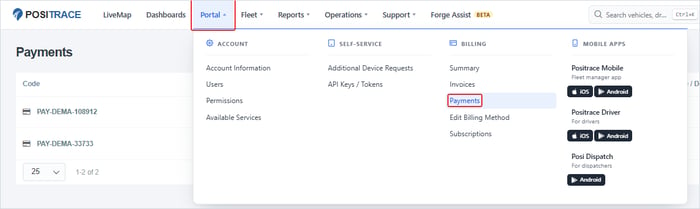
- The list shows each payment's code, payment date, status, payment method, document (CC / Cheque / Doc: the card, cheque or document number) and amount.

- Click the magnifying glass next to a payment to see its details, including the transaction amount, notes, and the invoices the payment was applied to.
Payment statuses
| Status | What it means |
|---|---|
| Success | The payment was received. |
| Failed | The payment did not go through. |
| Refunded | The payment was refunded to you. |
| Reversed | The payment was reversed, for example by your bank. |
Tip: To find a payment quickly, click the filter icon at the top right of the list and search by Payment Code or filter by Payment Statuses.