![PosiTrace Logo.png]](https://kb.positrace.com/hs-fs/hubfs/PosiTrace%20Logo.png?height=50&name=PosiTrace%20Logo.png)
To add a new piece of equipment to your account, just follow these steps.
-
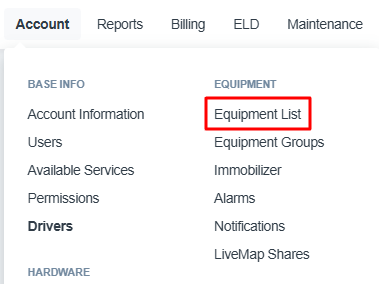
Go to Account → Equipment List.
- Click the Button labelled + Add New.
- If you don't see this button, your user account may not have permission to add or remove equipment. If you believe you should have this permission, contact your administrator.

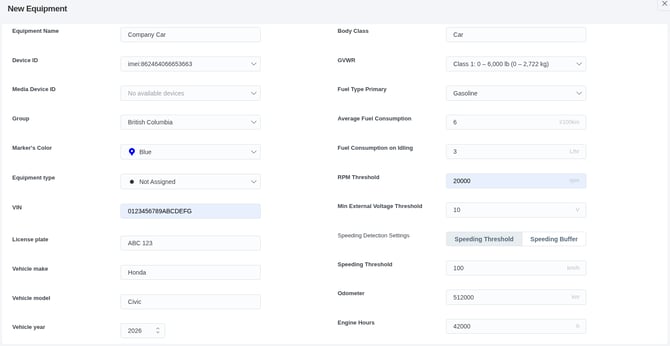
- Fill out the fields as appropriate.
- Note that you don't need to fill everything out — in most cases, just a name and device ID will be sufficient. Please ensure that you enter the correct device ID (usually the "IMEI" number) when creating a vehicle.
- Scroll down and click Save.

If you need to use a device that was previously assigned to another piece of equipment, or you are installing a new device in an existing piece of equipment, please contact our support team for assistance.
For more details, see the article “Copy tracking history between devices.”