
An Offline chip on a vehicle means its GPS device isn't connected to PosiTrace right now. The chip also shows how long it has been offline. The vehicle's last known location stays on the map.

All vehicles offline at once? Check your connection first
If every vehicle suddenly shows offline, or a vehicle you're following stops moving, the problem is usually your browser's connection to Locate's Live Update server, not the vehicles.
Look at the icon to the left of Map Settings at the top of the LiveMap:
- Green check: the connection is stable ("The connection to the live update server is stable").
- Red X: the connection was lost. Locate shows Connection to live update server lost. Refresh page to reconnect for live updates. Refresh the page to see the real status again.
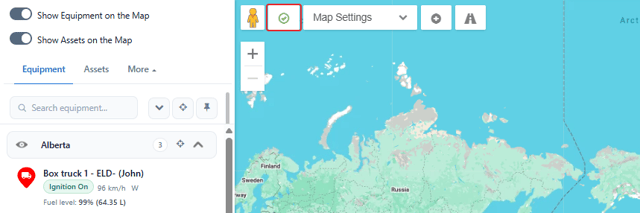
If the icon turns red again after refreshing, something between your computer and Locate is blocking the connection, such as a firewall, VPN, security software or your internet connection. Try another network or browser (see supported web browsers), or ask your IT team to allow Locate's live updates.
Why one vehicle goes offline
No cellular coverage
The device can't reach the cellular network, for example when the vehicle is:
- in a remote area, such as mountains, farmland or long stretches of highway between towns;
- parked indoors, underground or in a parking garage, or between tall buildings;
- using an older 2G or 3G device in an area where those networks have been shut down;
- affected by a carrier outage.
This usually fixes itself when the vehicle moves or the network recovers.
No power
- A plug-and-play device may have been unplugged, on purpose or by accident.
- On a hardwired device, the power or ground wire may be loose or disconnected.
Power problems often leave clues before the device goes offline: a Low External Voltage chip (if a voltage threshold is set), a Sleep Mode chip on some devices, 0 V reported, or a backup battery message.

To check whether a vehicle lost power or coverage, run Reports > Power and Connectivity Events for that vehicle.
Data limit reached
Some devices have a monthly data limit. A device that reaches it can stop reporting until the limit resets. See Understanding the Data Usage indicator.
Device fault
Rarely, the device itself fails. If you think that's the case, open a ticket in Support > Tickets > Add New, or contact PosiTrace Support by email or phone.
Offline isn't the same as No GPS
Offline means the device isn't connected to the network. No GPS means the device is connected but can't get a GPS position. A vehicle can show one or both: in an underground car park, for example, it can lose cellular and GPS at the same time. See What does No GPS mean?