
When you no longer need a device, you can ask us to deactivate it. Deactivation stops tracking and billing for that device. You can request it in Locate, by support ticket or by email.
Before you request a deactivation
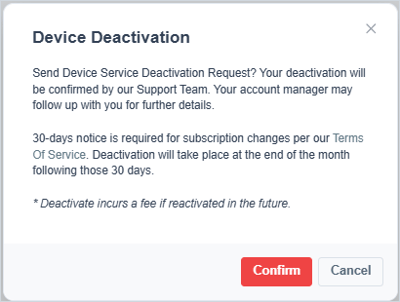
- 30 days' written notice: subscription changes need 30 days' written notice, as set out in our Terms of Service. The deactivation takes place on the last business day of the month after the 30-day notice period ends.
- Term agreements: if your devices are under a term agreement, any remaining fees in your agreement must be paid before the deactivation takes place. Otherwise, the deactivation may be postponed. Your account manager will confirm any amounts with you.
- Prepaid billing: if you pay in advance (for example, annually), your account manager will review any prepaid months with you.
- Reactivation: a deactivated device can be reactivated within 12 months. A reactivation fee applies, and a new 12-month term agreement is required.
Request a deactivation in Locate
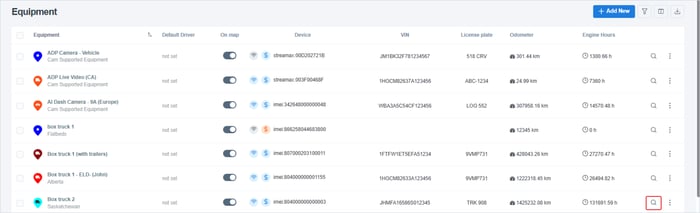
- Go to Fleet > Equipment List.

- Click the magnifying glass next to the equipment.
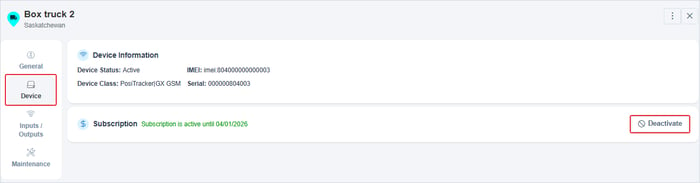
- Open the Device tab. Under Subscription, click Deactivate.
- Read the notice and click Confirm to send your request. Our Support team will confirm the deactivation, and your account manager may contact you for details.
Repeat these steps for each device. To deactivate many devices at once, it is easier to open one support ticket that lists them all.
Other ways to request a deactivation
- Support ticket: go to Support > Tickets > Add New and list each device by name or IMEI.
- Email: write to support@positrace.com with the same details.
Requests made by phone must be confirmed in writing by ticket or email.
What happens next
- We confirm the deactivation date with you by email.
- On that date, billing stops and the device no longer appears in Locate.
Suspension
Suspension, which pauses a device at a reduced monthly rate, is not available on new agreements. If your agreement includes suspension, you can suspend devices for up to 3 months per calendar year. Suspensions take effect at the end of the calendar month, and reactivating a suspended device is free. Contact your account manager to check whether your agreement includes suspension.
Reactivate a device
- Request a reactivation by support ticket or by email to support@positrace.com. We restore service as quickly as possible.
- A deactivated device can be reactivated within 12 months. A reactivation fee applies, and a new 12-month term agreement is required.
- After 12 months, reactivation can't be guaranteed, because the mobile carrier may cancel the device's SIM card.
Cancel your account
To close your account, open a support ticket. All of your devices are deactivated as described above, and the account is closed once any balance owing is paid. Before your account closes, download any invoices and reports you want to keep.